We’re excited to share a few new updates with you this winter, along with some tried-and-true teacher favorites to explore in 2026. Check out the latest updates and revisit powerful tools that will help you make the most of TCI in your classroom. Sign in to your TCI teacher account to explore these features.
New! More Languages for Translation
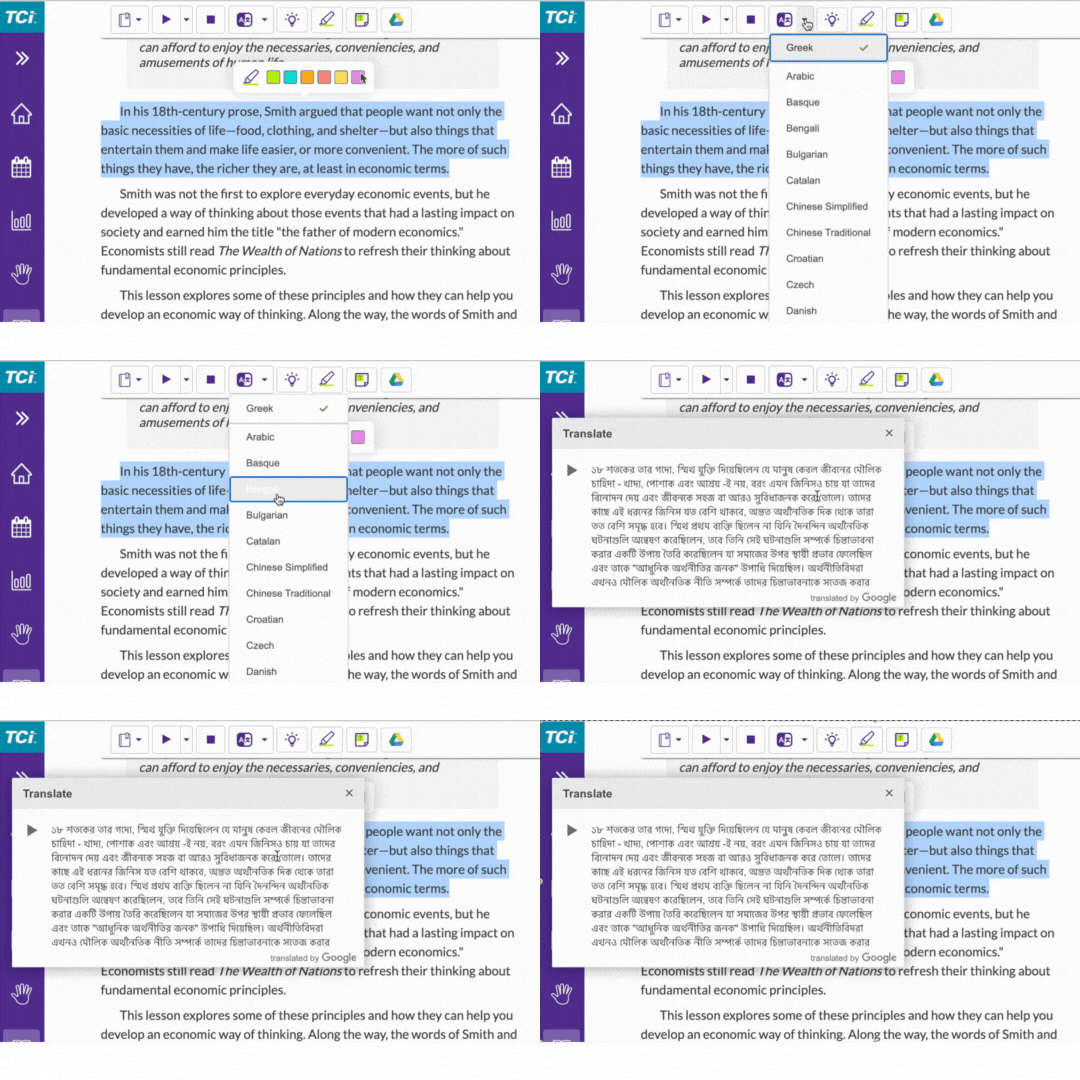
We’ve expanded our translation tool to include dozens of new languages—including Haitian Creole—thanks to your feedback. You’ll also find a helpful new search feature, making it easy to quickly locate any language you need.
You can access the translation tool with the reading online. Select the text, choose a language, and see your content instantly translated to support all learners. To provide additional reading support, text-to-speech is also offered for many languages. We plan to expand this feature to include additional languages in the future.
New! Clip Art for Assessments
Get creative! Now, when customizing assessment questions, you can add clip art images—on top of background images—to drawing questions. Clipart can be moved, resized, and manipulated right in the prompt, offering more flexibility for visual learners and hands-on tasks.
Oldies but Goodies: Features Teachers Love
Some updates stand the test of time—here are a few favorites you might have missed from earlier in 2025.
- Video Activities: Video-driven, flexible activities for middle and high school social studies—perfect for remediation, review, or helping students catch up after holidays. Science teachers: Be sure to check out the Key Science Concept videos for middle school as well.
- Differentiation Tools—Access Points (Now Available in Third-Edition Programs): We know that every classroom is unique. Access Points make it easier to support all learners. If you are using a third edition program, the Access Points for Differentiation handouts are now available in the Planning Box in your teacher account. These handouts are a ready-to-use, modified version of the reading notes that focus on vocabulary and review questions that cover the lesson’s main ideas.
Coming in February: Try the New Grades Page Beta
You’ll soon have the option to try out the New Grades Page beta, arriving early February.
- A cleaner, more focused grades table—see only what you’ve assigned
- One score per assignment to make grading simple
- A grading process that’s now more consistent with your LMS
You can explore the new Grades Page when you’re ready—nothing changes unless you choose to opt in. Keep an eye out for more details soon.
TCI continues to grow with your feedback. We can’t wait for you and your students to experience these new updates. If you have questions or want to share your feedback, we’d love to hear from you.
Sign in to your TCI teacher account to explore these exciting new features. Stay informed about the latest updates on the TCI Product Updates page or by checking the gift box notifications in your account.